Resynthesize the Spectrum of Any Sound
A unique music and sound-design tool that analyzes the spectral content of any audio signal and uses that analysis to drive a bank of 1 to 33 oscillators, reproducing the input spectrum in real time or mutating it in a multitude of wildly creative ways.
Created by Rossum Electro-Music software architect Bob Bliss, who also fathered E-mu's famed "EOS" Emulator Operating System, Panharmonium pairs deep spectral processing with an interface whose immediacy encourages performance and interaction.
Input can be anything from a single oscillator to an entire mix, including vocals. From dense, swirling pads and drones that evolve with the input's changing spectrum, to clock-syncable spectral arpeggiation, to as-yet-unnamed harmonic effects, Panharmonium opens up an entirely new world of sonic possibilities.
It can also take a snapshot of an instantaneous spectrum and use that as a complex harmonic oscillator, which can then be modified and modulated by all of Panharmonium's other controls.
Specifications
| Resynthesis oscillators | 1–33 |
| Waveforms | sine · tri · saw · pulse + 2 crossfading |
| Tuning range | ±7 semitones |
| Octave shift | yes |
| Glide | per-oscillator polyphonic |
| Slice clock | internal · tap · external |
| Center freq & bandwidth | CV + attenuverter |
| Freeze | sustains analyzed spectrum |
| Blur | spectral lag, CV-controlled |
| Feedback | to self-sustaining output |
| Spectra memories | 12 |
| Presets | 12 |
| Width | 26 HP |
| Depth | 25 mm |
| Power | ±12 V · reverse-polarity protected |
| Current draw | 140 mA / 30 mA |
See It in Action
Introduction & Overview: a tour of Panharmonium's spectral analysis and resynthesis.
Sound demonstration
Show 5 more videos...
Demonstration Series, pt. 3
Demonstration Series, pt. 4
Tutorial, pt. 1 (Learning Modular)
Tutorial, pt. 2 (Learning Modular)
Intro demo (Synthplex 2019)
How Spectral Resynthesis Works
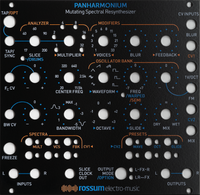
Panharmonium accomplishes its magic through a chain of functional submodules: analyze, modify, resynthesize. Understanding the path makes the controls intuitive.
Spectral Analyzer. The analyzer defines how the incoming audio is transformed into spectral data. The Slice parameter sets the rate of that transform: set by the Slice and Multiplier controls, the Tap button, or an external clock. Very short slice times yield real-time spectral tracking; longer times create rhythmic spectral patterns. Center Freq and Bandwidth (with CV and attenuverters) select the range of frequencies analyzed: narrow-to-wide pass bands on one side of the pot, narrow-to-wide notches on the other. The Freeze button sustains the currently analyzed spectrum.
Spectral Modifiers. These creatively reshape the analyzed spectrum. Voice selects from 1 to 33 oscillators for the resynthesis. Blur is a spectral lag processor that controls how quickly the spectrum can change. Feedback routes the resynthesized audio back into the processing chain for subtle or dramatic effects. At maximum, the output becomes self-sustaining even after the input is removed.
Oscillator Bank. The bank resynthesizes the spectrum. Waveform chooses the oscillators' shape: the usual sine, triangle, sawtooth and pulse, plus two special crossfading sine and sawtooth waves. Freq tunes the oscillators over a ±7-semitone range (further set by the 1V/Oct and FM inputs), Octave shifts by octaves, Glide sets per-oscillator polyphonic glide, and Mix balances the original input against the resynthesized audio.
Beyond the basics. Holding Output Mode while adjusting Slice enables Drums Mode, optimizing analysis for percussive input. Holding Output Mode while adjusting Freq enables Spectral Warping, which shifts harmonic elements individually, producing clangorous, swarming textures rather than preserving harmonic relationships. Twelve Spectra memories store frozen slices (each up to 33 oscillators wide) for pitched playback, and twelve Presets capture every module setting along with any CVs present at the moment of saving.
"Panharmonium opens up an entirely new world of sonic possibilities: from dense evolving drones to spectral arpeggiation to harmonic effects that don't yet have names."
Manuals & Guides
Firmware & Software
Firmware
Presets & Factory Content
Boot Software
Frequently Asked Questions
What is Panharmonium?
Panharmonium is a spectral resynthesizer for Eurorack. It analyzes the harmonic content of any incoming audio and rebuilds it through a bank of up to 33 oscillators. Depending on the settings, it can faithfully reproduce the input spectrum in real time or mutate it in wildly creative ways. It was designed by Bob Bliss, a Rossum software architect and the creator of E-mu's EOS Emulator operating system. Panharmonium brings additive resynthesis to Eurorack. That technique was previously found only in rare instruments like the Synclavier and Technos Acxel.
Is Panharmonium an effect or a synthesizer?
Both. With an audio input, Panharmonium is a spectral processor that transforms incoming sound. With Freeze engaged (or Feedback at maximum sustain) it becomes a self-contained polyphonic additive synthesizer. It is neither a traditional filter nor a reverb. That surprises some buyers. Think of it as a real-time spectral remixer.
How does Panharmonium compare to a vocoder?
Both analyze input spectra, but in very different ways. A vocoder imposes the spectral envelope of one signal onto the carrier of another. Panharmonium resynthesizes the spectrum with its own oscillator bank and gives extensive control over how that resynthesis is modified. It can do vocoder-like effects but goes far deeper into spectral manipulation.
How does Panharmonium compare to the Make Noise Spectraphon?
Both are takes on spectral synthesis. Panharmonium is a spectral resynthesizer with up to 33 oscillators and a mutating analysis workflow. It excels at evolving spectral pads and spectral mangling. Users note the Make Noise Spectraphon has less noticeable latency. The two approach spectral sound differently. The better choice depends on your workflow.
Click to show more questions...
Overview
What software is similar to Panharmonium?
The closest software analogues are Image-Line Harmor, iZotope Iris and MetaSynth. None behaves exactly like Panharmonium. Each still gives you a feel for spectral analysis and resynthesis.
Specifications & Power
How wide is Panharmonium and will it fit in my case?
The Panharmonium is 26 HP wide and 25 mm deep. Its shallow depth fits any standard Eurorack case, including skiff-style cases like the 4ms Pod series and Tiptop Mantis.
What are Panharmonium's power requirements?
The Panharmonium draws 140 mA on +12V and 30 mA on -12V. It uses a standard 16-pin Doepfer-style connector and is reverse-polarity protected.
What CV and modulation inputs does Panharmonium have?
Panharmonium puts most of its analysis and oscillator parameters under voltage control. Its CV inputs are:
- Center Freq and Bandwidth, each with an attenuverter
- Slice rate, drivable by an external clock
- 1V/Oct and FM (the FM input has its own attenuverter)
- Blur and Mix
The 1V/Oct and FM inputs set the pitch of stored Spectra and the resynthesized output. You can play frozen spectra melodically. Because nearly every key parameter is sweepable, Panharmonium responds well to envelopes, LFOs and sequencers patched into both the analysis and resynthesis stages.
Sound & Function
What can I feed into Panharmonium?
Almost anything. Panharmonium analyzes the spectral content of whatever you feed it and resynthesizes it through the oscillator bank. Good sources include a single oscillator, a drum loop, vocals, a full mix, field recordings and external instruments. Results vary dramatically with the input material and control settings. That range is part of what makes it such a deep sound-design tool.
Does the input signal need to be a certain level?
Panharmonium works best with a strong, clean signal. Eurorack-level signals of around 5 Vpp are ideal. Low-level signals produce weak or erratic analysis. If the output sounds thin or unstable, boost the input with a VCA, mixer or preamp. Very hot signals can cause distortion. Attenuate if needed. The left input is normalled to the right. For mono sources, patch only the left input.
How does the Spectral Analyzer work?
The Spectral Analyzer controls how incoming audio is converted to spectral data. The Slice parameter sets the analysis rate. Very short slice times give real-time spectral tracking. Longer times create rhythmic spectral patterns that can be clock-synced. The Center Frequency and Bandwidth controls define which frequency range is analyzed. Both are CV-controllable with attenuverters. Sweeping them gives filter-like effects on the analysis itself.
What does the Voice parameter do?
Voice selects how many oscillators (1 to 33) resynthesize the analyzed spectrum. With one voice you get monophonic tracking of the loudest spectral component. With 33 you get a dense, full-bandwidth resynthesis. Settings in between thin complex spectra into sparser, more identifiable tones.
What are the Blur and Feedback controls?
Blur is a spectral lag processor that controls how quickly the resynthesized spectrum can change. High blur creates smooth, smeared transitions between spectral snapshots, ideal for evolving pads. Feedback routes the resynthesized output back into the processing chain. At maximum it becomes self-sustaining, even with the input removed entirely.
What is the Freeze function?
Pressing Freeze captures the currently analyzed spectrum as a static snapshot. The oscillator bank then sustains it indefinitely. You can play the frozen spectrum chromatically through the 1V/Oct input and FM controls. This effectively turns any moment of audio into a playable complex harmonic oscillator.
What is Freeze Tap Mode?
Freeze Tap Mode performs a new spectral analysis only on a Tap/Opt button press or a trigger at the Tap input. Between taps, the current spectrum is held frozen. It is useful for capturing specific spectral moments, creating rhythmic snapshots or building spectral sequences. If Panharmonium seems stuck on one spectrum and unresponsive to input, check whether Freeze Tap Mode is accidentally engaged. Look for the Multiplier 2, 8 and 32 LEDs lit at once.
What is Spectral Warping?
Spectral Warping shifts individual harmonic components independently rather than preserving their harmonic relationships. This produces clangorous, swarming, inharmonic textures unlike conventional pitch shifting. Access it by holding the Output Mode button and adjusting the Freq control.
What is Drums Mode?
Drums Mode optimizes the spectral analysis for percussive inputs. It changes the analysis window to better capture transients and rhythmic content. Access it by holding the Output Mode button and adjusting the Slice control.
What do the Center Freq and Bandwidth controls do?
The Center Freq and Bandwidth controls define the range of frequencies Panharmonium analyzes. Center Freq sets where the analysis band sits. Bandwidth sets its width. The Bandwidth pot is bipolar. Left of center selects narrow-to-wide pass bands. Right of center selects narrow-to-wide notches. Both have their own CV inputs and attenuverters. You can sweep the analysis frequency and reshape the band under voltage control. Sweeping Center Freq with a narrow Bandwidth isolates and moves a slice of the input's spectrum. Opening Bandwidth captures more of it. Because you are shaping what gets analyzed rather than simply filtering the audio, modulating these controls opens up filtering-like, vowel-like and formant-shifting effects on the output.
What oscillator waveforms can Panharmonium use?
The Waveform parameter selects the waveform used by Panharmonium's bank of resynthesis oscillators. Alongside the usual sine, triangle, sawtooth and pulse waves, it includes two special crossfading sine and sawtooth waveforms. Because up to 33 oscillators stack to rebuild the analyzed spectrum, the chosen waveform strongly colors the result. Sine gives the most faithful reconstruction. Sawtooth and pulse add extra harmonics for denser, brighter textures. The crossfading waveforms morph between shapes for evolving timbres. Waveform choice interacts with the Voice, Octave and Spectral Warping settings. You can move from faithful resynthesis toward wholly new sounds.
How do I tune and shape the oscillator output (Freq, Octave, Glide, Mix)?
Panharmonium's Oscillator Bank has four output controls:
- Freq tunes the oscillators over a ±7 semitone range and responds to the 1V/Oct and FM inputs
- Octave shifts the output pitch by octaves
- Glide sets a polyphonic glide amount
- Mix balances the dry input against the resynthesized audio and has its own CV input
Glide is genuinely polyphonic. Each oscillator has its own glide circuit. Pitches slew independently rather than as a single portamento. Because Freq responds to 1V/Oct, you can play the resynthesized spectrum, or a stored Spectra memory, as a pitched voice. Mix lets Panharmonium sit anywhere between a parallel effect and a full replacement of the input signal.
How do I set the analysis (Slice) rate, and can I clock-sync it?
The Slice parameter sets the rate at which incoming audio is transformed into spectral data. You can set it four ways: the Slice control, the Multiplier, tapping the Tap button, or an external clock. Yes, it can be clock-synced. Because Slice accepts an external clock, Panharmonium locks to your patch for tempo-locked spectral arpeggiation. The analyzed spectrum then steps in time with your sequencer. The Multiplier places the analysis on musical subdivisions of that base rate. Very short slice times give real-time spectral tracking. Short slices favor smooth, evolving pads that follow the input. Longer, clocked slices turn the same input into rhythmic, stuttering harmonic sequences.
Can I quantize pitch adjustments to semitones?
Yes. Hold the Tap button while adjusting the Freq control to quantize its frequency adjustments to semitones. Freq then moves in musical steps instead of continuously. This makes it easy to transpose the resynthesized output, or a stored Spectra memory, to exact intervals. It is one of several hidden functions reached by holding a button while turning a knob. Note that this is a tuning quantizer, not a musical-scale quantizer.
Performance
Can Panharmonium be used live despite its latency?
Yes, with some planning. Panharmonium introduces noticeable processing latency because spectral analysis inherently takes time. This is fundamental to the algorithm, not a bug. It suits studio work, sound design and non-time-critical performance best. To play it live, work at slower tempos, practice against the latency or add matching delay elsewhere in the signal path to line things up. For low-latency live spectral work, a different tool may be a better fit.
Presets & Memory
How many presets and spectra can I save?
Panharmonium has 12 user Spectra memories and 12 user Presets. A Spectra memory stores a frozen spectral snapshot. A Preset stores a full control snapshot, including all knob positions and any CV values present when you saved it. There are also 12 factory memories of each type.
How do I reset to factory presets?
You do not need a destructive factory reset. Panharmonium's 12 factory Spectra memories and 12 factory Presets are permanent and cannot be overwritten. They are stored separately from your 12 user slots. To load a factory sound, recall it from the factory bank instead of the user bank. Your own user presets stay untouched.
Firmware
What's the latest Panharmonium firmware, and do I need to update?
The latest Panharmonium firmware is 1.50l (download: 1.50l_220430), released April 2022. It only fixes bugs tied to rare manufacturing variations in the hardware. If your Panharmonium works correctly, you do not need to update. The download page also has the original factory Spectra and Presets content (download: 1.00lc_190618). Reload that only if you have overwritten the factory memories.
How do I check my Panharmonium firmware version?
Hold Tap/Opt + Freeze + Output Mode together. Then press Preset 1. The Spectra LED shows the digit before the decimal. The Presets LED shows the first digit after it. If you need the latest firmware (download: 1.50l_220430), get it from the product page.
How do I update Panharmonium's firmware?
Panharmonium firmware (download: 1.50l_220430) is delivered as a WAV file you play into the module through the 1V/Oct input.
- Connect your playback device's output to the 1V/Oct input.
- Power on while holding Spectra 5 and 6. The Multiplier 2, 8 and 32 LEDs light.
- Press Tap/Opt. Spectra 1 lights to show it is waiting for audio.
- Play the WAV file at line level, with other system audio muted.
- On success, Spectra 4 lights briefly and the module reboots automatically.
As the file plays, Spectra 2 confirms audio is detected and Spectra 3 confirms it is recognized as software data. The Multiplier LEDs act first as a VU meter, then as a progress indicator. If all the Multiplier and Preset LEDs light, the update failed. This is almost always a too-low playback level. Click Tap/Opt, adjust the level and try again.
Troubleshooting
How do I recalibrate Panharmonium if the output sounds wrong or pitches are off?
First let Panharmonium warm up for at least 60 seconds. Then remove all patch cords and set the three attenuverter pots (Fc CV, BW CV, FM) to 12:00.
- Hold FREEZE + TAP/OPT + OUTPUT MODE. Still holding, press SPECTRA 1 within one second. Its LED flashes to confirm.
- Patch a precise 4.000 V source, such as a Control Forge, to the 1V/OCT input. Hold the same three buttons and press SPECTRA 2. If its LED does not flash, the input is below 3.4 V. Check your source.
- Patch Left Output to Left Input and Right Output to Right Input. Hold the three buttons and press SPECTRA 3. Its LED flashes while held.
Calibration is now complete and saved.
Why is the level low when I patch only one input?
This is normal. It depends on which input you use. The right input is normalled to the left. With nothing in the right input, the left signal feeds both channels. A left-only patch stays full. If you patch only the right input, you bypass that normalling and feed just one channel. That sounds quieter. For a mono source, patch the left input. Also check the Mix control and output-mode settings.
How do I recover Panharmonium if it won't process audio after a firmware update?
Check that the Dry/Wet control is not fully wet with no input. Verify the input is patched correctly. Then try recalling factory content. If it still will not process audio, please contact support. It may need a firmware reflash.
Panharmonium cycles its LEDs at power-on then goes dead. Is it broken?
First rule out power and orientation. Confirm the ribbon cable is installed with the red stripe oriented correctly and that the case supplies adequate power. A brief red LED flash at startup suggests the bus connection is live. Panharmonium has also been reported not to work in some Niftycase setups. Try another case to isolate a power-compatibility issue. If it still cycles its LEDs and then stays unresponsive to every button press, it likely points to a hardware fault. Please contact support with your details.
Why do I hear a clicking noise on the crossfading waveforms?
There have been reports of a clicking or clipping sound on the crossfading sine and sawtooth waveforms at certain settings. It tends to appear with the Center Frequency around 10 to 12 o'clock at high Bandwidth. It can also appear with Slice, Multiplier and Voice at their extremes. It does not depend on the source material. Moving any one of those controls slightly away from that point usually clears it. The standard, non-crossfading waveforms are not affected. If it persists or gets in your way, please contact support.
Feature Requests
Can you add scale quantization, waveform morphing, or stereo spread?
Panharmonium's feature set is defined by its current firmware, version 1.50l. Waveform crossfading, or morphing, is a known community request. So are scale-based quantization and stereo spread. Panharmonium's built-in quantize is tuning-only, not scale-based. Rossum takes user feedback into consideration but as a small team, does not have the resources to make every great idea a reality so we can't make any promises. To add your vote, please contact support.
Replacement Parts
Genuine replacement panels and kits for your Panharmonium.